
AI Image Upscaler – Upscale & Enhance Images to 4x Free
Enlarge low-resolution images up to 4x with AI super-resolution. Restore sharp detail in old photos, product shots and artwork — free, no sign-up.
Drop image here
or click to browse · paste with Ctrl+V
PNG, JPG, WebP · up to 10MB
Upscale your image up to 4x
Drop or paste a low-resolution image above and we'll sharpen every detail.

What Is an AI Image Upscaler and How Does Super-Resolution Work?
An AI image upscaler is a free online tool that enlarges images up to 4x while reconstructing lost detail, rather than simply stretching pixels like conventional software. Utilizing advanced deep-learning super-resolution models trained on millions of high-fidelity photographs, the AI predicts realistic micro-textures, crisp boundaries, and natural lighting at 4K resolution. Whether you are converting a low-resolution JPG, PNG or WebP into a 4K print-ready file, restoring cherished vintage family photos, or sharpening e-commerce product listings, our tool delivers professional-grade clarity. The entire process runs online in your browser with no sign-up, no watermark, and zero software installation required. convert low-res images into 4K without watermarks
When You Need More Than a Simple Resize
Enlarging an image by stretching it never works well. Interpolation just spreads the existing pixels across a bigger canvas, which is why a simple resize leaves you with blurry edges and pixelation. That is fine for a quick draft, but useless when you want to print a poster, restore an old family photo, or post a crisp product shot on a marketplace that zooms in on the details. An AI photo enhancer free tool like this one approaches the problem differently — instead of stretching, it reconstructs detail using a trained model.
AI super-resolution understands what real-world texture looks like — skin, fabric, fur, foliage — and fills in plausible detail where the original image has none. It also removes compression artifacts and softens jagged edges, so you can upscale photo results that actually look like high-resolution originals rather than stretched thumbnails. This image resolution enhancer is the best ai image upscaler approach for anyone who needs to enlarge photo without losing quality.
The most common uses are restoring scanned vintage family photos, preparing print-ready graphics from small source files, and sharpening product images for e-commerce. Use this sharpen image online tool to recover fine details like faces, clothing textures and printed text that a plain resize would leave blurry. When you need to clean up the subject of a photo first, run it through our free AI background remover to isolate the subject, then upscale for a crisp, cutout-ready PNG.
AI Super-Resolution vs. Simple Resizing
Not all ways to enlarge an image are the same. Here is what actually happens with each approach.
| Option | What you get | Best for |
|---|---|---|
AI Super-ResolutionRecommended | Reconstructs missing detail with a trained model — smoothing edges, removing artifacts and adding realistic texture. Produces sharp, natural enlargements up to 4x. | Anyone who wants an enlargement that actually looks good |
Simple Resize / InterpolationBlurry | Bilinear or nearest-neighbour interpolation just stretches existing pixels. Edges become soft or jagged and the image looks blurry or pixelated at larger sizes. | Quick drafts where sharpness does not matter |
Practical Workflows for AI Super-Resolution & 4K Upscaling
AI super-resolution is a critical asset across commercial printing, vintage photo restoration, and digital publishing. Explore our primary workflows:
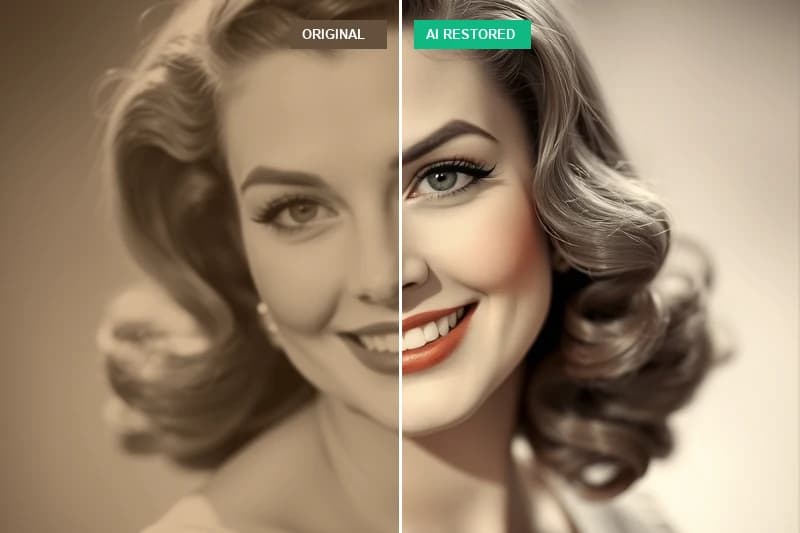
Restore Old, Faded & Vintage Family Photos
Scan aged, low-resolution family photographs and upscale them up to 4x. Real-ESRGAN accurately synthesizes missing facial skin textures, fabric weave, and hairline sharpness that bicubic stretching blurs.
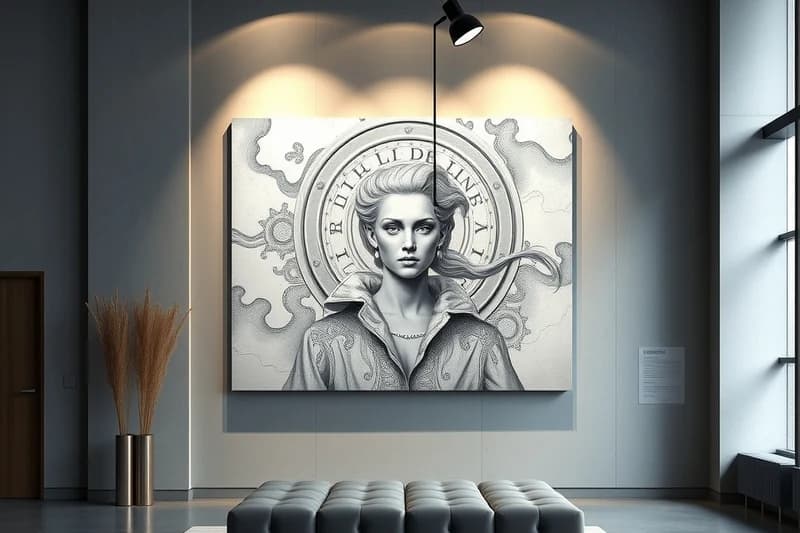
Prepare 4K Print-Ready 300 DPI Graphics & Posters
Transform small web-grade digital assets into high-DPI print files. Elevate 512×512 px web illustrations to 2048×2048 px or 4096×4096 px for crisp gallery prints, marketing banners, and physical merchandise.

Sharpen E-Commerce Product Shots for Marketplace Zoom
Enhance product imagery for Shopify, Amazon, and Etsy. Upscaling delivers crisp micro-details on close-up hover zooms, meeting high-resolution marketplace standards and improving buyer trust.
Anime & Digital Art 4K Wallpaper Enhancement
Enlarge digital drawings, manga scans, and AI concept artwork into ultra-sharp 4K wallpapers. The model preserves clean vector-like lineart while completely eliminating JPEG compression blocking.
Sharpen AI Generated Drafts for Client Deliverables
Generated a fast draft with our free AI image generator or image to image AI? Run it through 4x upscaling to eliminate softness and deliver final presentation-ready artwork.
How to Upscale an Image Without Losing Quality
Super-resolution is powerful, but a few habits get you noticeably better output.
Start with the sharpest source you have
The AI can reconstruct detail, but it cannot create information that was never there. A sharp 800px photo upscales far better than a blurry 2000px one.
Do not over-upscale in one pass
Upscaling beyond 4x can start to look artificial. If you need more, upscale in stages and check the result between passes.
Clean up obvious defects first
Heavy compression artifacts or noise can confuse the model. Denoise first, then upscale, for cleaner textures.
How to Upscale an Image in 3 Steps
Enlarge and enhance any image in under a minute.
Upload your image
Drop in a JPG, PNG or WebP file. Low-resolution, compressed and old scans all work well as input.
Choose your upscale level
Pick 2x or 4x magnification. The AI reconstructs sharp detail while removing blur and compression artifacts.
Download the enhanced image
Preview the result and download the high-resolution file, ready for print, publishing or further editing.